
You can deposit money to your trading account directly in your Trader Area or in FBS mobile app.
Please be kindly reminded that some payment systems are available in certain regions only, and might not be available for your country. You can check all the payment systems available on the Deposit page or on our website here.
To deposit using your digital wallet, please follow the instructions below.
Web-version:
Click on "Finances" in the menu on the right and choose "Deposit":

Click on the account to specify which trading account you want to deposit to:
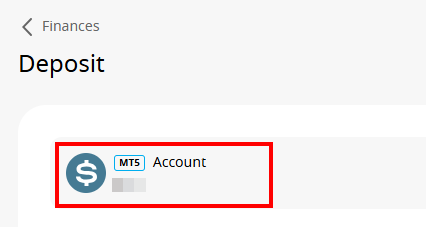
Choose the “Electronic payments” option to see ones available to you:

Fill in the required information to process your deposit. The requirements vary from wallet to wallet. Please follow the instructions on the deposit page.
Please be aware that there might be certain minimum and maximum limits set by the payment system itself. The exact limits will be stated on the deposit page directly.
Click on “Confirm”
You will be able to monitor the status of your financial requests in the Transaction History
Mobile:
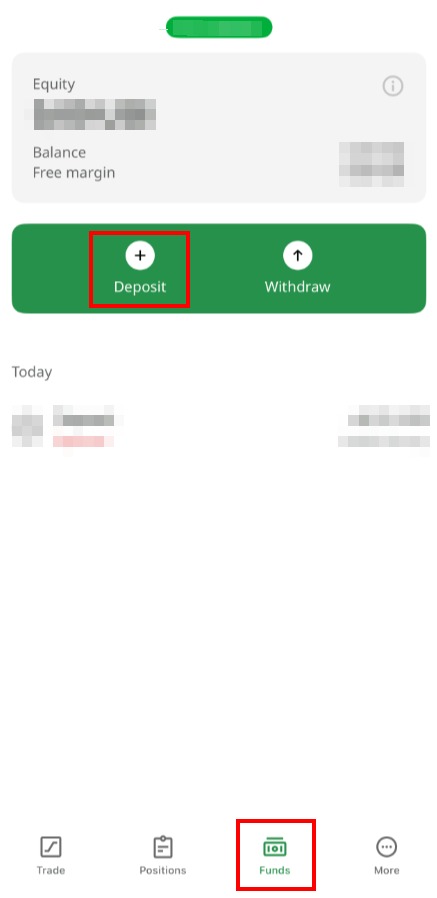
Click on "Funds" in the bottom menu and choose "Deposit":
Click on the payment system you prefer;
Fill in the required information to process your deposit. The requirements vary from wallet to wallet. Please follow the instructions on the deposit page.
Please be aware that there might be certain minimum and maximum limits set by the payment system itself. The exact limits will be stated on the deposit page directly.
Click on “Confirm”
You will be able to monitor the status of your financial requests in the Transaction History