
How does withdrawal work
FBS provides a wide range of payment methods available for withdrawal, depending on your country of residence. You may check all payment systems available on the Withdrawal page.
Withdrawal requests are processed in several stages. First, the FBS Financial Department reviews your request within 24 hours. Once approved, the request is forwarded to the payment vendor, and then to the relevant payment system or bank for final processing. The total time until funds arrive depends on the withdrawal method: for digital wallets and payment systems, funds are credited the same day, while for bank accounts or cards, crediting takes 2–7 business days.
Withdrawal process
We follow Anti-Money Laundering (AML) regulations for all withdrawals. Funds cannot be withdrawn to third-party accounts. In line with our policy and the Customer Agreement, you can withdraw funds only to the payment systems that were used for the deposit, and only to the same account, card, or e-wallet you deposited from.
You can withdraw with any of the payment methods you used for deposit, in any order you prefer, up to the deposited amount for each method. Once you have withdrawn the deposited amount, you will be able to withdraw the profits gained.
Please be careful when submitting a withdrawal request. The name on the account, card, or e-wallet you deposited from must match the name on your trading account.
What if your payment details have changed?
If you no longer have access to the account, card, or e-wallet you used for the deposit, or its details have changed, please contact our support team. You may be asked to provide supporting documents to confirm ownership before your withdrawal can be processed.
Withdrawal priority
Please note that when you use multiple deposit methods, your withdrawals should follow this priority:
Card methods. Deposited funds should first be returned to the card(s) used for the deposit.
Other payment methods. Choose any order you prefer, within the deposit amount for each method.
Profit, bonuses, and other credit. Withdraw using any available payment system other than cards.
For example, you deposited $30 via card, then $20 via Skrill, and $10 via Neteller, then made a profit of $40. Your total balance is $100, and the withdrawal scheme will be like this:
Payment method | Withdrawal | |
Priority 1 | Card method | $30 |
Priority 2 | Skrill and Neteller in any order you prefer | $20 to Skrill $10 to Neteller |
Priority 3 | Profit withdrawal to any available payment system other than cards | $40 |
Also note that the withdrawal should not necessarily be in the same exact amounts as you deposited.
For example, suppose you’ve made two deposits.
$100 via Method 1
$50 via Method 2
You can withdraw all at once, or in parts, in any sequence: $10 with Method 1, then $20 with Method 2, then $50 with Method 1, then $30 with Method 2, and finally $40 with Method 1 — all within the limits of what you deposited to each method.
Withdrawal flow
You can withdraw money from your account in your Trader Area or in FBS app.
PC
Click on "Finances" in the menu on the left and choose "Withdrawal":

Choose a suitable payment system and click on it;
Specify the trading account you want to withdraw from;
Specify information about your e-wallet or payment system account according to the instructions on the withdrawal page.
Type the amount of money you want to withdraw;
Click on the “Confirm withdrawal” button;
Fill in the OTP, which will be sent to you via email or SMS, depending on which confirmation method you have selected.
Mobile
Open "Funds" tab and select “Withdraw” as shown:
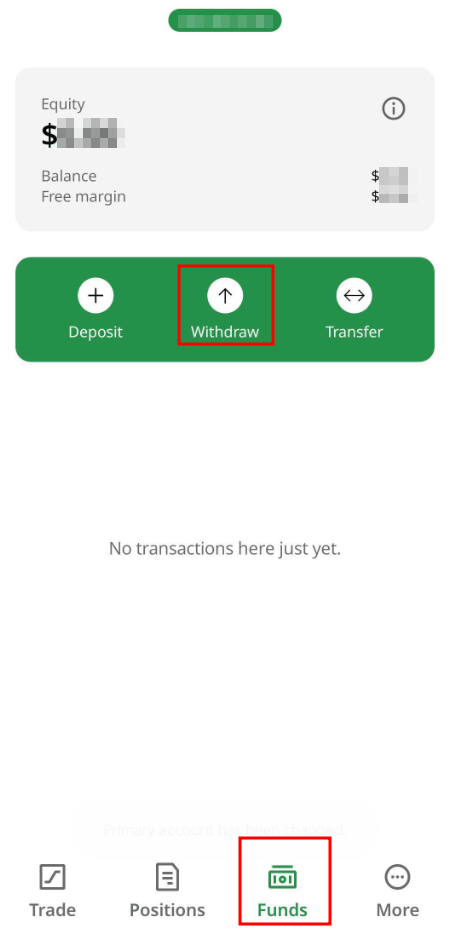
Specify the trading account you want to withdraw from;
Choose a suitable payment system and click on it;
Specify information about your e-wallet or payment system account according to the instructions on the withdrawal page.
Type the amount of money you want to withdraw;
Click on the “Confirm withdrawal” button.
Fill in the OTP, which will be sent to you via email or SMS, depending on which confirmation method you have selected.
Once you create a withdrawal request, you will be able to monitor its status in the Transaction History.