
Changing account status to Swap-free is available in the Trader Area account settings. You can enable the Swap-free option on all real accounts while creating the trading account or in account settings.
How you can switch it on:
PC
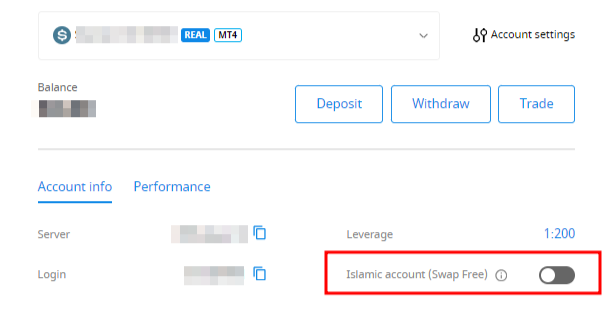
Select the needed account in the Dashboard;
Scroll down to find "Swap-free" in the "Account settings" section and click on the button to activate the option:
Mobile
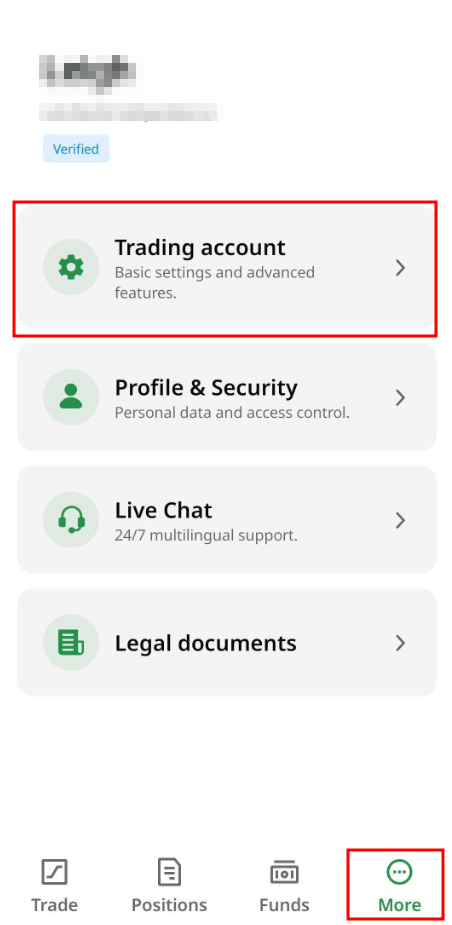
Click on "More" in the bottom menu and select "Trading account":
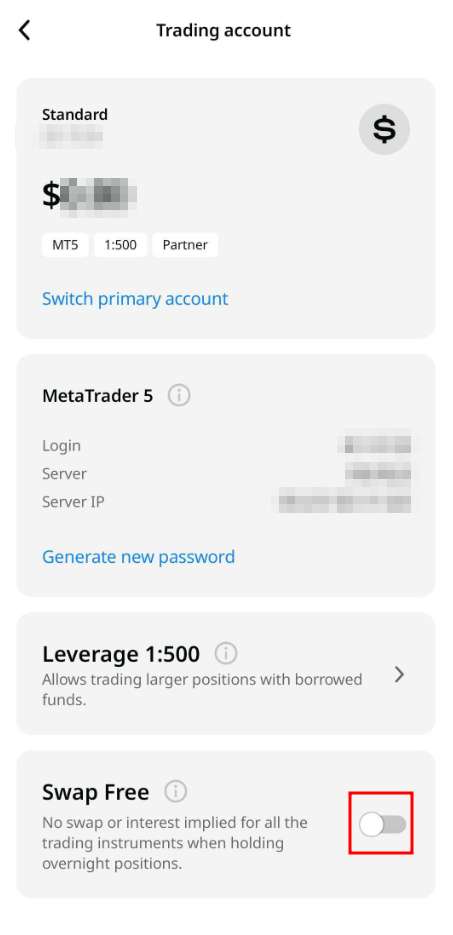
On the account settings page, click on the switch next to "Swap Free" to enable this option :
Please be kindly reminded, according to the Trading Conditions:
6.2. In terms of exotics for Swap free accounts for long-term strategies, the Company charges a fixed weekly commission starting from the second Sunday if the order wasn’t closed by that day. The weekly commission is fixed and determined on the Website. This commission is not an interest and depends on whether the trade is open to buy or sell.
By opening a Swap-free account with FBS, the client agrees that the company may debit the fee from their trading account at any time.